A:
SMS Text Notification Feature
An FDmail message notification will be sent via TEXT message to
parents' cell phones. Only those who have elected to allow (activated)
the feature will receive the notification because normal cell phone
provider text message fees apply.
SMS technology will strip any HTML code used within the message.
Information sent via text messaging is not secure. Do not include any
sensitive material. FCC regulations apply. Messages retrieved from the
school portal are protected by USER passwords and Secure Socket Layer,
to help ensure the privacy and integrity of information transmitted
over the internet.
|
****************************************************************
How Parents
Permission Their Account
Step 1 (On the App):
Click the 'Display Parent Data' option in the menu on your Home page.
Step 1 (In a Browser):
Click the 'View/Edit Parent Information' button at the top of your Home
page.
Step 2:
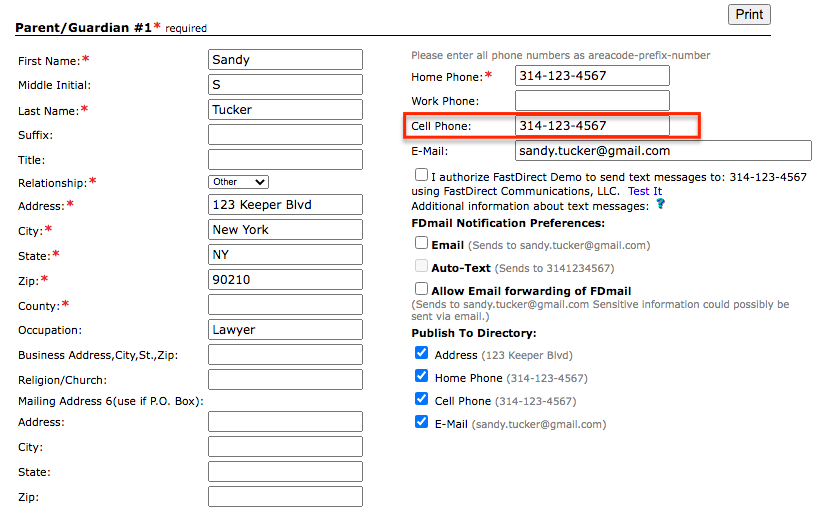
Enter in a cell phone number for Parent/Guardian #1 and/or
Parent/Guardian #2.
Step 3:
Once you have entered a cell phone number, you can opt in to the
following:
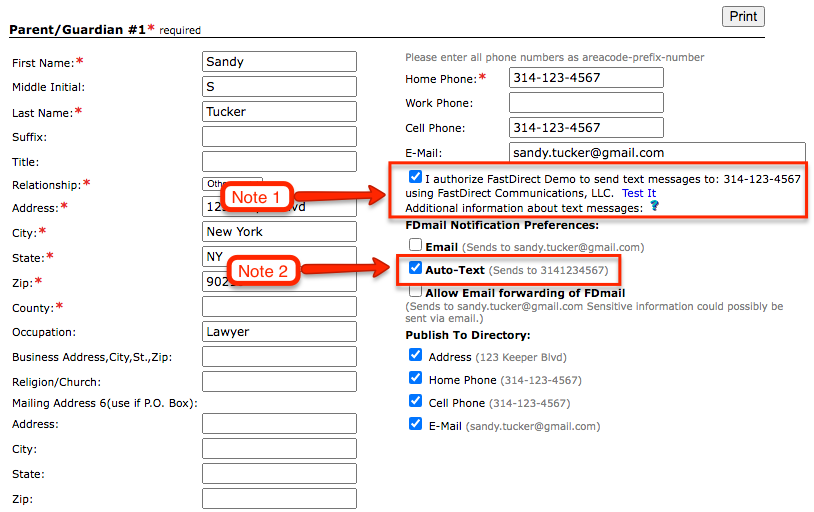
Note 1 = Check mark 'I
authorize' if you want to receive a text forward from messages sent
from the school (when chosen by the sender)
Note 2 = Check mark
Auto-text to receive automatic text notifications for messages sent to
your parent account. Please note this can only be selected after
placing a check mark for 'I authorize'.
Step 4:
Click the 'Save Changes' button located right below the parent form.
Step 5:
Click 'Test It' (located underneath the 'I authorize..' statement) to
send a test notification to your cell phone in order
to verify that you are activated!
|